
Solving Runtime Error 91
If a calculator is producing a “Runtime Error 91” we suggest using the Mantis Access App.
How To Use The Mantis Access App
The Mantis Access App is a new tool available on the portal that provides access to calculators with start errors.
Avoiding Error 91 In The Future
Calculators downloaded from our portal after 27 August 2025 have been fixed and will not produce the error. This method is recommended for accessing older calculators that you need to reference.
Step 1: Download The App
The app is available on portal or can be downloaded below.
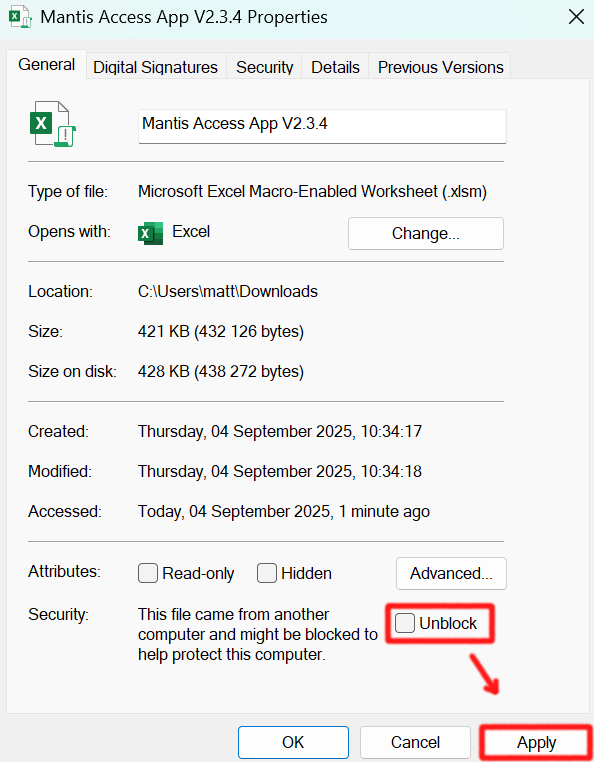
Step 2: Unblock The Macros
- Once the app is downloaded
- Right click on the app and select “Properties”
- Ensure you are in the “General” tab.
- Check the “Unblock” box
- Then select Apply
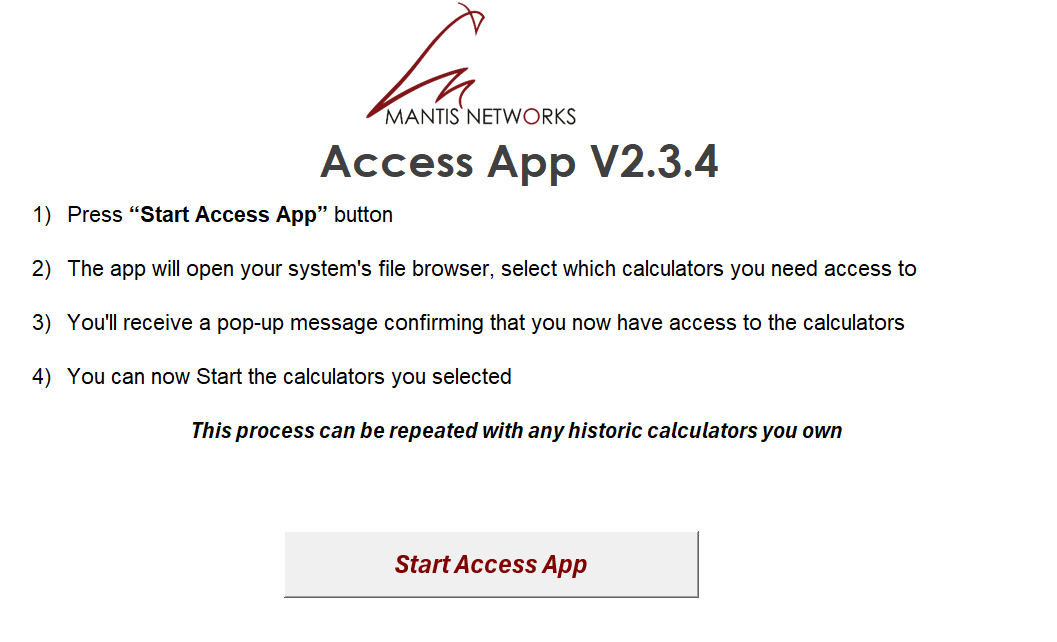
Step 3: Open The Access App
Be sure to enable content when you open the app. Otherwise the Access app won’t function properly
- Start the Access App
- The app will open for file explorer
- Find the calculator(s) you want to access
- Select “Open”
- You will be informed that the calculator can now be accessed
Once you have used the Access App, be sure to save it in an accessible place. If the error reappears simply run the Access App again, selecting the calculators you need access to.
I'm Still Experiencing Errors
If you are still experiencing errors please log a support ticket or give us a call.
